> ## Documentation Index
> Fetch the complete documentation index at: https://help.nextmatter.com/llms.txt
> Use this file to discover all available pages before exploring further.
# Sub-workflow triggering
> If you're onboarding a new customer and part of the workflow is to get some legal paperwork ready. Instead of doing that as part of the entire customer onboarding process flow you can trigger a sub-workflow.
## Before you begin
* In Next Matter, go to **Workflows**, and create the first workflow. You will embed the sub-workflow into this workflow.
* Have your **API key** at hand. If you don't have it, contact your organization admin, or, if you're an admin, generate the key in Next Matter by going to **Company > Next Matter API keys**.
* Note down the ID of the workflow that will be triggered with the first workflow. You can get the ID by clicking the follow-up workflow and copying the number from the URL in your browser.
## Create and embed the sub-workflow
1. In Next Matter, go to **Workflows**.
2. Click **Create workflow** and create the workflow that will become the sub-workflow.
3. Note down the ID of the workflow. You can get the ID by clicking the follow-up workflow and copying the number from the URL in your browser.
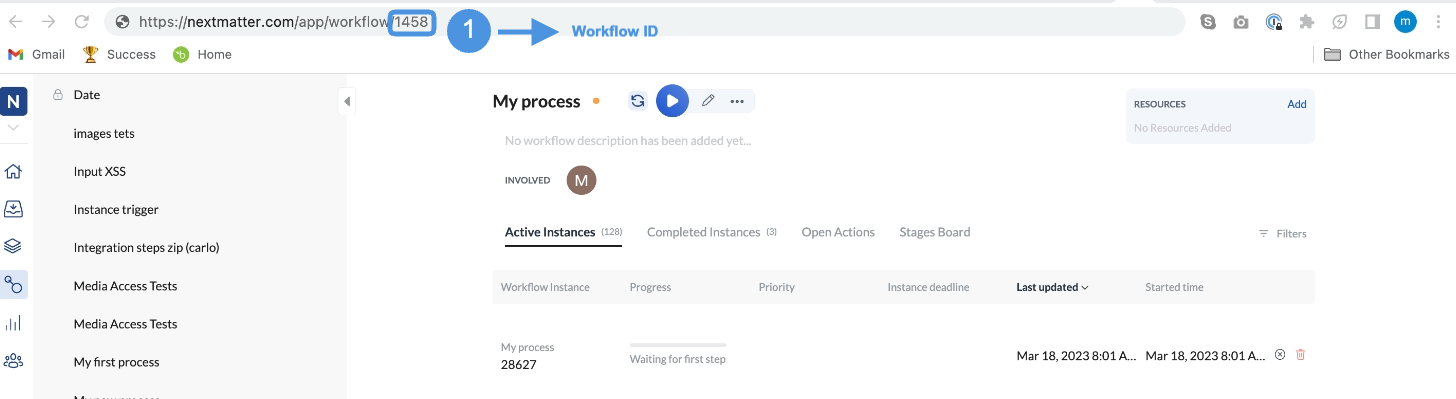 4. Open the main workflow you created.
5. In the place where the sub-workflow should be started add an **Integration > Custom integration** step.
6. Click **Settings** and enter the following data:
* **Method**: POST
* **URL**: `https://core.nextmatter.com/api/instances/`
* **Headers**: Content-type: `application/json`
* **Headers**: Authorization: `Your_NextMatter_API_Key`
* **Body**:
```Text JSON theme={null}
{
"process": "https://core.nextmatter.com/api/processes/MAIN_WORKFLOW_ID/",
"name": "{Instance ID}- Sub-workflow"
}
```
7. Save your changes.
4. Open the main workflow you created.
5. In the place where the sub-workflow should be started add an **Integration > Custom integration** step.
6. Click **Settings** and enter the following data:
* **Method**: POST
* **URL**: `https://core.nextmatter.com/api/instances/`
* **Headers**: Content-type: `application/json`
* **Headers**: Authorization: `Your_NextMatter_API_Key`
* **Body**:
```Text JSON theme={null}
{
"process": "https://core.nextmatter.com/api/processes/MAIN_WORKFLOW_ID/",
"name": "{Instance ID}- Sub-workflow"
}
```
7. Save your changes.