> ## Documentation Index
> Fetch the complete documentation index at: https://help.nextmatter.com/llms.txt
> Use this file to discover all available pages before exploring further.
# Monitor progress with roadmap
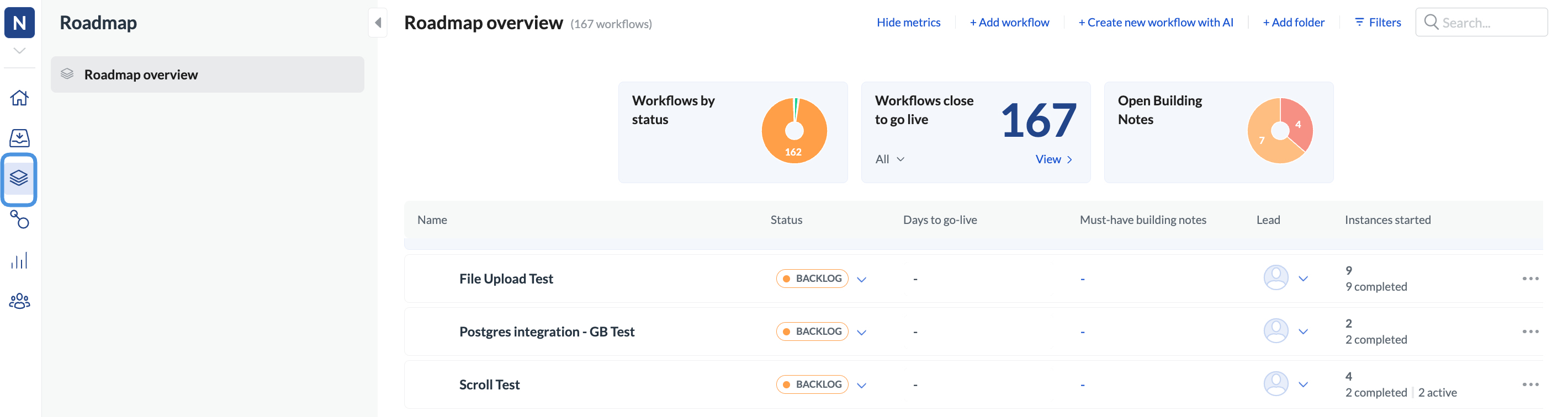
> With roadmap you can get a 360-degree view of your workflows and instances. Use it for reporting or reviewing statuses and to define who builds which workflow by when.
To open the roadmap, click **Roadmap** in the left-hand navigation. You can also access the roadmap from your Next Matter dashboard.
 ## Roadmap for managers
### Filtering for the right data
As a manager, you can quickly access metrics and see where the team is at implementing and running workflows. You can filter the data by:
* Workflow status
* Time to go live
* Workflow lead
### Monitor
Have an overview of the workflows that are live versus those that are still on the backlog. You can also update the status label for each workflow, and prioritize those that are critical.
If need be, you can quickly access the workflow to change the lead or update the go-live date.
## Roadmap for builders
### Quick access
As a builder, you can use roadmaps to quickly access workflow status and monitor which workflows are about to go live. You can drill down to check whether all builder notes have been completed, or, if some have not, click the **number link** to see what still needs your attention.
You can also click the **eye or pencil icon** (if you have edit rights) to quickly view and update the workflow.
## Roadmap for managers
### Filtering for the right data
As a manager, you can quickly access metrics and see where the team is at implementing and running workflows. You can filter the data by:
* Workflow status
* Time to go live
* Workflow lead
### Monitor
Have an overview of the workflows that are live versus those that are still on the backlog. You can also update the status label for each workflow, and prioritize those that are critical.
If need be, you can quickly access the workflow to change the lead or update the go-live date.
## Roadmap for builders
### Quick access
As a builder, you can use roadmaps to quickly access workflow status and monitor which workflows are about to go live. You can drill down to check whether all builder notes have been completed, or, if some have not, click the **number link** to see what still needs your attention.
You can also click the **eye or pencil icon** (if you have edit rights) to quickly view and update the workflow.
 ### Troubleshooting
Use the instances started column to monitor any overdue or canceled instances and access them quickly. You can also verify the completed instances.
### Troubleshooting
Use the instances started column to monitor any overdue or canceled instances and access them quickly. You can also verify the completed instances.
 ### Workflow suggestions
If you need suggestions on how to break a workflow down into steps, use the AI process builder to give you some hints. Click **+ Create new workflow with AI** for our Chat GPT-powered AI engine to help out.
### Workflow suggestions
If you need suggestions on how to break a workflow down into steps, use the AI process builder to give you some hints. Click **+ Create new workflow with AI** for our Chat GPT-powered AI engine to help out.