> ## Documentation Index
> Fetch the complete documentation index at: https://help.nextmatter.com/llms.txt
> Use this file to discover all available pages before exploring further.

# Get started: Work with tasks

> As a Next Matter user you'll be working with tasks and getting notifications in your inbox.

As a full user, you have access to most Next Matter functionalities. However, it's a good idea to start your journey with the following:

* how to use your inbox
* how to complete a task
* how to collaborate on workflows or ask a question

### Using your inbox: Watch a tour

<iframe width="560" height="315" src="https://demo.arcade.software/7qMbR4UODjKA0XuCQRJD?embed&embed_mobile=tab&embed_desktop=inline&show_copy_link=true" title="Tutorial" frameborder="0" allow="accelerometer; autoplay; clipboard-write; encrypted-media; gyroscope; picture-in-picture" allowfullscreen aria-describedby="Online tutorial" />

### Completing a task: Watch a tour

<iframe width="560" height="315" src="https://demo.arcade.software/hRpDMtymYf7dC7DTBPWx?embed&embed_mobile=tab&embed_desktop=inline&show_copy_link=true" title="Tutorial" frameborder="0" allow="accelerometer; autoplay; clipboard-write; encrypted-media; gyroscope; picture-in-picture" allowfullscreen aria-describedby="Online tutorial" />

### Collaborating on tasks: Watch a tour

<iframe width="560" height="315" src="https://demo.arcade.software/pSprlUbVzGTS68aITSEl?embed&embed_mobile=tab&embed_desktop=inline&show_copy_link=true" title="Tutorial" frameborder="0" allow="accelerometer; autoplay; clipboard-write; encrypted-media; gyroscope; picture-in-picture" allowfullscreen aria-describedby="Online tutorial" />

### Managing notifications: Watch a tour

<iframe width="560" height="315" src="https://demo.arcade.software/XszC0QmUCl7zpUHSl0Wg?embed&embed_mobile=tab&embed_desktop=inline&show_copy_link=true" title="Tutorial" frameborder="0" allow="accelerometer; autoplay; clipboard-write; encrypted-media; gyroscope; picture-in-picture" allowfullscreen aria-describedby="Online tutorial" />

## Tips and tricks

When you've mastered the basics, you can move to to these articles to get more insights into Next Matter.

<Accordion title="Set up Slack notifications and out-of-office">
  <iframe width="560" height="315" src="https://demo.arcade.software/WPUTCHbs2sOkL8jYH13X?embed&embed_mobile=tab&embed_desktop=inline&show_copy_link=true" title="Tutorial" frameborder="0" allow="accelerometer; autoplay; clipboard-write; encrypted-media; gyroscope; picture-in-picture" allowfullscreen aria-describedby="Online tutorial" />
</Accordion>

<Accordion title="Change your password">
  <iframe width="560" height="315" src="https://demo.arcade.software/G9vYiQ5rWU5R1uKBlJxz?embed&embed_mobile=tab&embed_desktop=inline&show_copy_link=true" title="Tutorial" frameborder="0" allow="accelerometer; autoplay; clipboard-write; encrypted-media; gyroscope; picture-in-picture" allowfullscreen aria-describedby="Online tutorial" />
</Accordion>

<Accordion title="Use portals as a quick resolution center">
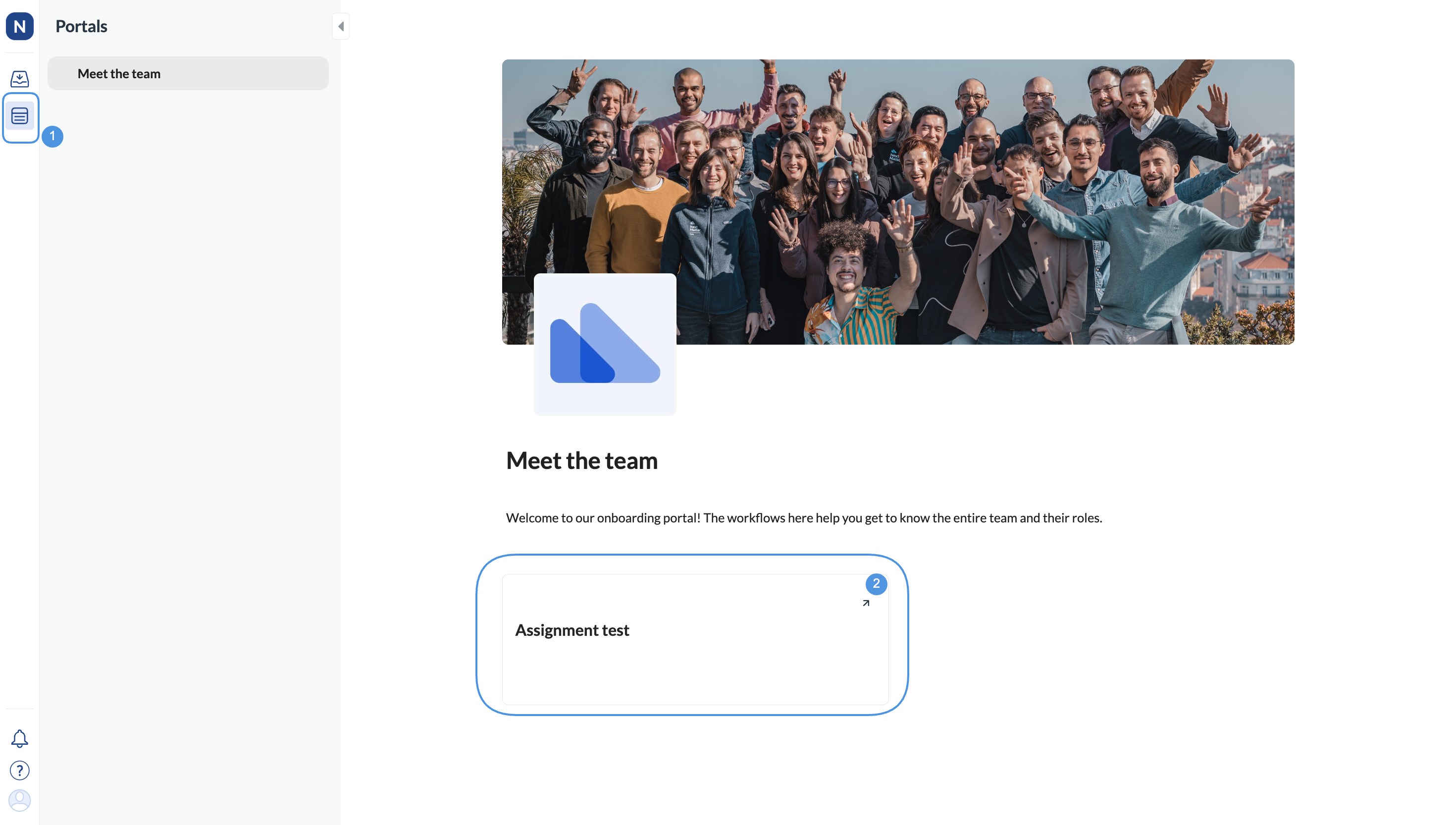
  Sometimes, company admins can collect workflows and present them as portals. These are pages you can use to start a workflow and get to a solution quickly.

  If your admin shares a portal with you, you'll get an email invitation to create a Next Matter account. Create it and do the following:

  1. Open **Portals** (under **Inbox** in your left-hand navigation).
  2. Start the workflow by clicking its tile.
  <Frame>
    <img src="https://mintcdn.com/nextmatter/2sBPfWILWLfMdiFz/images/docs/f9abffd-portals.png?fit=max&auto=format&n=2sBPfWILWLfMdiFz&q=85&s=f5fe7d06950e6642b686b3fa446f680c" alt="Image of potrals" width="2940" height="1666" data-path="images/docs/f9abffd-portals.png" />
  </Frame>
</Accordion>
